Why I'm Paying For Three AI Coding Tools
It started as an experiment. I'd been using Copilot since 2023 and liked it. Cursor was getting a lot of buzz in developer circles. Claude Code had just launched and the early reviews from people I trust were unusually positive. So I decided to use all three for a few months and see which one actually earned its subscription fee.
Six months later, I'm still paying for all three. Not because I'm indecisive or bad with money (well, maybe a little). Because they do fundamentally different things and, used together, they complement each other in ways that make me meaningfully more productive than any single tool alone.
Here's how I think about each one, with specific examples of when each has saved me — and when each has wasted my time.
GitHub Copilot: The Autocomplete King
Copilot is the simplest of the three, and in some ways the most useful. It lives in your editor and autocompletes code as you type. It watches what you're doing and suggests the next few lines. It's not flashy. It doesn't have a chat interface that feels like talking to a colleague. It just quietly fills in the boring parts of your code.
For the mechanical work of programming — writing getter and setter methods, mapping between similar data structures, generating boilerplate, implementing obvious patterns — Copilot is excellent. It's fast, it's usually correct, and it saves me from typing out things I've typed a thousand times before. I'd estimate Copilot alone saves me maybe 30-45 minutes a day just on keystrokes.
Where Copilot falls down: anything that requires understanding more than the current file. It doesn't really know about the rest of your codebase. It can't reason about architecture. If you're doing something unusual, it confidently suggests the standard approach — which might be exactly wrong for your situation.
Copilot is best for: writing code you already know how to write, faster. It's a productivity multiplier for experienced developers doing routine work. Cost: $10/month for individuals, often free through employer or student plans.
Cursor: The AI-Native Editor
Cursor is an entire code editor built around AI, forked from VS Code. Instead of bolting AI features onto an existing editor — which is what Copilot and Claude Code both do — Cursor rethinks the editing experience from the ground up with AI as a first-class citizen.
The killer feature is "Tab." In Cursor, pressing Tab doesn't just accept the current suggestion. It jumps to the next edit the AI thinks you want to make, which might be several lines away. You can basically Tab through an entire file, accepting or rejecting AI-suggested changes as you go. When it works, it feels like magic — you're editing at the speed of thought, the AI anticipating what you want before you realize you want it.
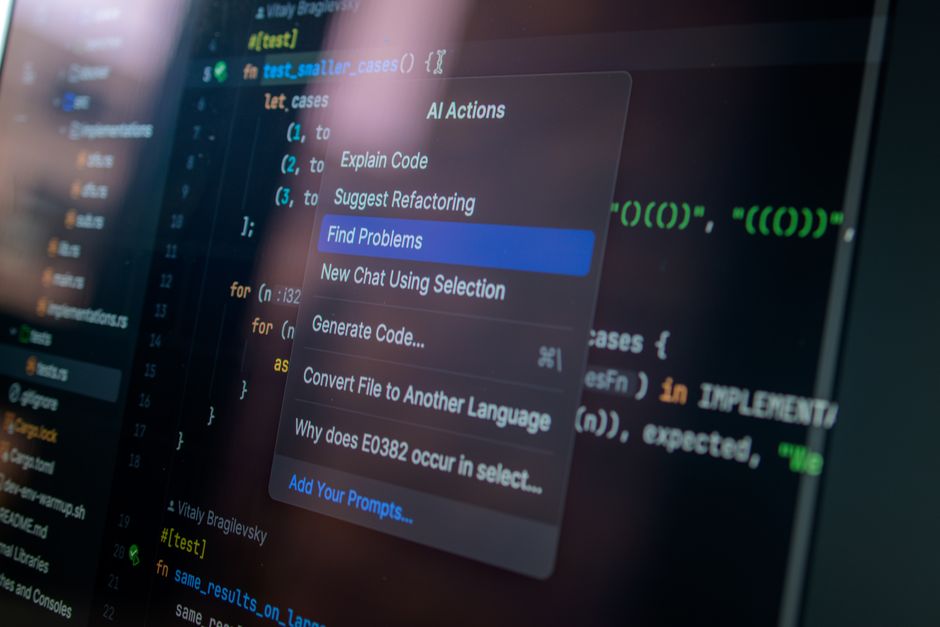
Cursor's chat interface is also excellent. You can select code, ask questions about it, request refactors, and have the AI apply changes directly to your files. The diff view makes it easy to accept or reject AI-suggested edits.
The downsides: Cursor is a new editor, and new editors have rough edges. Extensions sometimes break. The AI completions are occasionally too aggressive — suggesting changes I didn't ask for and don't want. There's a learning curve, and for the first week I was slower with Cursor than without it while I adjusted to the new interaction model.
Also, Cursor's approach works better for some programming styles than others. If you write code methodically, one function at a time, with clear interfaces between components, Cursor is fantastic. If you write code more experimentally — trying things, reverting, trying something else — the AI can feel like an overeager pair programmer who keeps finishing your sentences wrong.
Cursor is best for: experienced developers who want an editor that treats AI as a core part of the experience, not an add-on. The Tab-to-edit flow is genuinely innovative. Cost: $20/month for Pro.
Claude Code: The Thinker
Claude Code is the most different of the three. It runs in your terminal. It reads your entire codebase. And it reasons about problems in a way that the other tools don't.
The comparison I keep coming back to: Copilot is a fast typist. Cursor is a helpful editor. Claude Code is a colleague you can hand a problem to and say "what do you think?"
Its context handling is the differentiator. You can point Claude Code at your entire project and ask it to implement a feature that touches files across your codebase. It'll read the relevant files, understand how they relate, write the code, and explain its reasoning. Copilot can't do this at all. Cursor can do it, but with a smaller context window — it gets lost on larger codebases.
The terminal-native design is also worth mentioning. Claude Code integrates with git, runs shell commands, and can modify files directly. If you're comfortable in the terminal, this is powerful. If you prefer GUIs, it might feel spartan.
Where Claude Code struggles: speed. Because it's doing more sophisticated reasoning across a larger context, it's slower than Copilot or Cursor. Autocomplete it is not. You don't use Claude Code for real-time suggestions while typing — you use it for the harder problems that you'd otherwise spend an hour thinking about.
Claude Code is best for: complex tasks that span multiple files, debugging hard problems, understanding unfamiliar code, and architectural discussions. It's the tool you reach for when Copilot's autocomplete isn't enough. Cost: included with Claude Pro ($20/month).
How I Use All Three Together
Here's my actual workflow, which I've settled into after six months of experimentation:
Copilot runs constantly in the background for autocomplete. I barely think about it — it's just there, filling in the boring stuff. It's the most passive of the three, and that's by design.
Cursor is my main editor for feature work. I use Tab extensively to move through files. When I need to refactor something, I select the code, open the Cursor chat, describe what I want, and review the suggested changes.
Claude Code is for the hard problems. Debugging complex issues, understanding new codebases, making architectural decisions, implementing features that touch many files. I use it maybe 3-5 times a day, but each interaction solves a problem that would have taken 30 minutes to an hour of manual investigation.
Total cost: $50/month ($10 Copilot + $20 Cursor + $20 Claude Pro). For a professional developer, this is negligible compared to the time saved. Even if I conservatively estimate that these tools save me 5 hours a week — which feels low — the hourly return is excellent.
If I Had To Pick One
This is the question people always ask. If you could only keep one subscription, which one?
It depends on what kind of developer you are.
If you're a junior developer, I'd pick Claude Code. Not because it does the work for you — it doesn't, and you shouldn't use it that way — but because it explains things. You can ask "why did you do it this way?" and get a thoughtful answer. That's a learning accelerator that Copilot and Cursor don't provide.
If you're a senior developer doing mostly feature work in a familiar codebase, I'd pick Cursor. The editing experience is simply better than anything else available. The Tab-to-edit flow becomes addictive once you get used to it.
If you're a student or hobbyist on a budget, Copilot's free tier is genuinely useful and costs nothing. Start there.
If you're doing what I do — a mix of greenfield development, maintenance, and architecture — the combination of all three is worth the money. But if forced to choose, I'd keep Claude Code. It solves the hardest problems, and those are the ones where AI assistance is most valuable.